Theme Layout

Boxed or Wide or Framed

Wide

Theme Translation

Display Featured Slider

Featured Slider Styles

Display Grid Slider

yes

Grid Slider Styles

Display Trending Posts

Display Author Bio

Display Instagram Footer

off

Dark or Light Style

Light
Powered by Blogger.
Showing posts with label Javascript. Show all posts

Wednesday, February 22, 2017

[JavaScript] Hoisting

[JavaScript] Hoisting


# JavaScript Errors - Throw and Try to Catch


Hoisting is JSP's default behavior of moving declarations to the top.

● JavaScript Declarations are Hoisted

In JavaScript, a variable can be declared after it has been used.
In other words, a variable can be used before it has been declared.


Hoisting is JavaScript's default behavior of moving all declarations to the top of the current scope.

● JavaScript Initializations are Not Hoisted

JavaScript only hoists declarations, not initializations.
below two examples are similar, But result is different.


This because only the declaration ( var y), not the initialization (=7) is hoisted to the top.
Because of hoisting, y has been declared before it is used, but because initializations are not hoisted, the value of y is undefined.

Read more »
Unknown
0 Comments

You Might Also Like

[JavaScript] Errors - Throw and Try to Catch

[JavaScript] Errors - Throw and Try to Catch


# JavaScript Errors - Throw and Try to Catch


The try statement lets you test a block of code for errors.
The catch statement lets you handle the error.
The throw statement lets you create custom errors.
The finally statement lets you execute code, after try and catch, regardless of the result.

● Errors will Happen!

When executing JSP code, different errors can occur.
Errors can be coding errors made by the programmer, errors due to wrong input, and other unforeseeable things.

● JavaScript try and catch

the try statement allows programmer to define a block of code to be tested for errors while it is being executed.
The catch statement allows programmer to define a block of code to be executed, if an error occurs in the try block.
The JSP statement try and catch come in pairs.

https://www.w3schools.com/js/js_errors.asp

● JavaScript Throws Errors

When an error occurs, JSP will normally stop and generate an error message.
The technical term for this is. JSP will throw and exception (throw and error).

JavaScript will actually create an Error object with two properties. name and message.

● The throw Statement

The throw statement allows programmer to create a custom error.
Technically programmer can throw an exception.
The exception can be a SP string, a number, a boolean or an Object.
If programmer use throw together with try and catch, programmer can control program flow and generate custom error messages.

● Input Validation Example

This example examines input. If the value is wrong, an exception is thrown.
The exception is caught by the catch statement and custom error message is displayed.

● HTML Validation

The code above is just an example.
Modern browsers will often use a combination of JSP and built-in HTML validation,
using predefined validation rules defined in HTML attributes.
<input id="prac" type="number" min="5" max="10" step="1">

● The finally Statement

The finally statement lets programmer execute code, after try and catch, regardless of the result.

● The Error Object

JavaScript has a built in error object that provides error information when an error occurs.
The error object provides two useful properties. name and message.

● Error Object Properties

https://www.w3schools.com/js/js_errors.asp

● Error Name Values

6 different values can be returned by the error name property.

https://www.w3schools.com/js/js_errors.asp

● Range Error

A RangeError is thrown if programmer use a number that is outside the range of legal values. 

● Reference Error

ReferenceError is thrown if programmer use a variable that has not been declared.

● Syntax Error

SyntaxError is thrown if programmer try to evaluate code with a syntax error.

● Type Error

A TypeError is thrown if programmer use a value that is outside the range of expected type.

● URI Error

A URI Error is thrown if programmer use illegal characters in a URI function.


Read more »
Unknown
0 Comments

You Might Also Like

[JavaScript] Regular Expressions

[JavaScript] Regular Expressions


# JavaScript Regular Expressions


A regular Expression is a sequence of characters that forms a search pattern. The search pattern can be used for text search and text replace operations.

● Using String Methods

In JSP, regular expression to search for a match, and returns the position of the match.
The search() method uses an expression to search for a match, and returns the position of the match.
The replace() method returns a modified string where the pattern is replaced.

● Using String  search() With a Regular Expression

● Using String search() With String

The search method will also accept a string as search argument. The string argument will be converted to a regular expression.

● Using String replace() With String

The replace() method will also accept a string as search argument.

● Regular Expression Modifiers

Modifiers can be used to perform case-insentive more global searches.

https://www.w3schools.com/js/js_regexp.asp

● Regular Expression Patterns

Brackets are used to find a range of characters.

https://www.w3schools.com/js/js_regexp.asp

Metacharacters are characters with a special meaning.

https://www.w3schools.com/js/js_regexp.asp

Quantifiers define quantities.

https://www.w3schools.com/js/js_regexp.asp

● Using the RegExp Object

In JavaScript, The RegExp Object is a regular expression object with predefined properties and methods.

● Using test()

The test() method is a RegExp expression method.
It searches a string for a pattern, and returns true or false, depending on the result.
The following example searches a string for the character "e".

● Using exec()

The exec() method is a RegExp expression method.
It searches a string for a specified pattern, and returns the found text.
If no match is found, it returns null.
The following example searches a string for the character "e".


Read more »
Unknown
0 Comments

You Might Also Like

Tuesday, February 21, 2017

[JavaScript] Bitwise Operations

[JavaScript] Bitwise Operations


# JavaScript Bitwise Operations


● JavaScript Bitwise Operators

https://www.w3schools.com/js/js_bitwise.asp

● Bitwise AND

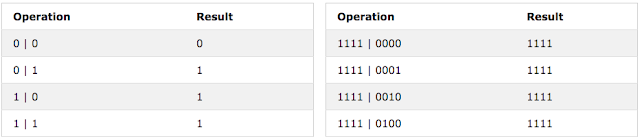
 When a bitwise AND is performed on a pair of bits, it returns 1 if both bits are 1.
One bit & 4 bits example are as follows.

https://www.w3schools.com/js/js_bitwise.asp

● Bitwise OR

When a bitwise OR is performed on a pair of bits, it returns 1 if one of the bits are 1.
One bit & 4 bits example are as follows.

https://www.w3schools.com/js/js_bitwise.asp

● Bitwise XOR

 When a bitwise XOR is performed on a pair for bits, it returns 1 if the bits are different.

https://www.w3schools.com/js/js_bitwise.asp

● JavaScript Bitwise Operations.

 JSP Bitwise operations works on 32bits signed integers.
Any number in a bitwise operation is converted into a 32 bit signed integer.
The result of a bitwise operation is converted back into a JavaSCript number.

● JavaScript Bitwise AND ( & )

Bitwise AND returns 1 only if both bits are 1.

● JavaScript Bitwise OR (|)

Bitwise OR returns 1 if one of the bits are 1.

● JavaScript Bitwise XOR ( ^ )

Bitwise XOR returns 1 if the bits are different.

● JavaScript Bitwise NOT ( ~ )

● JavaScript (Zero fill) Bitwise Left Shift (<<)

This is a zero fill left shift. One or more zero bits are pushed in from the right, and the leftmost bits fall off.


● JavaScript (Sign Preserving) Bitwise Right Shift(>>)

This is a sign preserving right shift. Copies of the leftmost bit are pushed in from the left, and the rightmost bits fall off.

● Converting Decimal to Binary


● Converting Binary to Decimal


Read more »
Unknown
0 Comments

You Might Also Like

[JavaScript] Type Conversion

[JavaScript] Type Conversion


# JavaScript Type Conversion


● JavaScript Data Types

In JSP there are 5 different date types that con contain values.
  • string
  • number
  • boolean
  • object
  • function
And, there are 3 types of objects.
  • Object
  • Date
  • Array
Last, 2 data types that can not contain values.
  • null
  • undefined

● The typeof Operator

Programmer can use the typeof operator to find the data type of a JSP variable.

● The Data Type of typeof

The typeof operator is not a variable. It is an operator. Operators do not have any data type. But, the typeof operator always returns a string.

● The constructor Property

The constructor property returns the constructor function for all JSP variables.


● JavaScript Type Conversion

JavaScript variables can be converted to a new variable and another data types.
  • By the use of a JavaScript function
  • Automatically by JavaScript itself

● Converting Numbers to Strings

The global method String() can convert numbers to strings.
It can be used on any type of numbers, literals, variables, or expressions.


The number Method toString() does the same.

● Converting Strings to Numbers

The global method Number() can convert strings to numbers.
Strings containing numbers convert to numbers.
Empty strings convert to 0.
Anything else converts to NaN ( Not A Number ).

● The Unary + Operator

The unary + operator can be used to convert a variable to a number.


If the variable can not be converted, it will still become a number, but with the value NaN.

● Converting Booleans to Numbers

The global method Number() can also convert booleans to numbers.

● Automatic Type Conversion

When JavaScript tries to operate on a "wrong" data type, it will try to convert the value to a "right" type.

https://www.w3schools.com/js/js_type_conversion.asp

● Automatic String Conversion.

JavaScript automatically calls the variable's toString() function when programmer try to "output" an object or a variable.

Read more »
Unknown
0 Comments

You Might Also Like

[JavaScript] Break and Continue

[JavaScript] Break and Continue


# JavaScript Break and Continue


● The Break Statement

The break statement can be used to jump out of a loop.
The break statement breaks the loop and continues executing the code after the loop.

● The Continue Statement


The continue statement breaks one iteration ( in the loop ), if a specified condition occurs, and continues with the next iteration in the loop.

● JavaScript Labels


To label JavaScript statements Programmer precede the statements with a label name and a colon.
The break and the continue statements are the only JSP statements that can "jump out of" a code block.
The continue statement ( with or without a label reference) can only be used to skip one loop iteration.
The break statement, without a label reference, can only be used to jump out of a loop or switch.
With a label reference, the break statement can be used to jump out of any code block.

Read more »
Unknown
0 Comments

You Might Also Like

Monday, February 20, 2017

[JavaScript] While Loop

[JavaScript] While Loop


# JavaScript While Loop


● The While Loop

The while loop loops through a block of code as long as a specified condition is true.

● The Do/While Loop

The do/while loop is a variant of the while loop. This loop will execute the code block once, before checking if the condition is true, then it will repeat the loop as long as the condition is true.


Read more »
Unknown
0 Comments

You Might Also Like

[JavaScript] For Loop

[JavaScript] For Loop


# JavaScript For Loop


● JavaScript Loops

Loops are handy, if programmer want to run the same code over and over again, each time with a different value.
Often this is the case when working with arrays.

● Different Kinds of Loops

 JavaScript supports different kinds of loops.
  • for - loops through a block of code a number of times
  • for/in - loops through the properties of an object
  • while - loops through a block of code while a specified condition is true
  • do/while - also loops through a block of code while a specified condition is true

● The For Loop

 The For loop is often the tool programmer will use when he want to create a loop.


● The For/In Loop

 The JavaScript for/in statement loops through the properties of an object.


Read more »
Unknown
0 Comments

You Might Also Like

[JavaScript] Switch Statement

[JavaScript] Switch Statement


# JavaScript Switch Statement


● The JavaScript Switch Statement

Use the switch statement to select one of many blocks of code to be executed.

● The break keyword

When JavaScript reaches a break keyword, it breaks out of the switch block.
this will stop the execution of more code and case testing inside the block.
When a match is found, and the job is done, it's time for a break. There is no need for more testing. It is not necessary to break the last case in a switch block. The block breaks there anyway.

● The default keyword

The default keyword specifies the code to run if there is no case match.


The default case does not have to be the last case in a switch block.

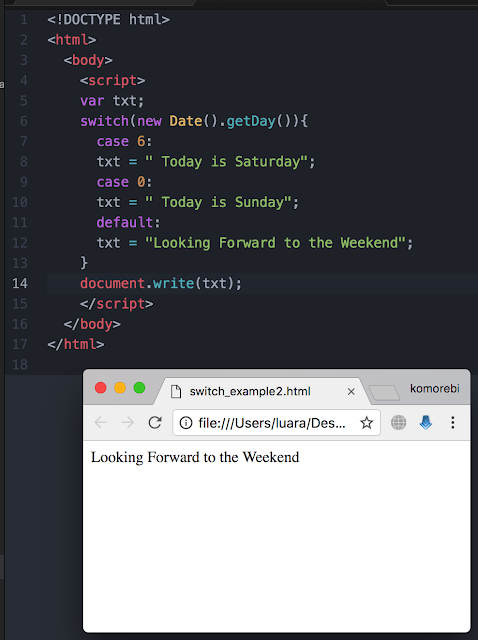
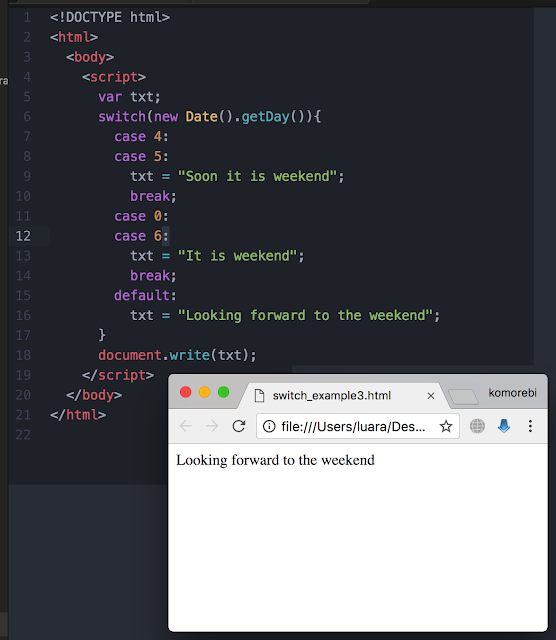
● Common Code Blocks

Sometimes programmer will want different switch cases to use the same code.
In this example case 4 and 5 share the same code block, and 0 and 6 share another code block.


Read more »
Unknown
0 Comments

You Might Also Like

[JavaScript] Comparison and Logical Operators

[JavaScript] Comparison and Logical Operators


# JavaScript Comparison and Logical Operators


● Comparison Operators

Comparison operators are used in logical statements to determine equality or difference between variables or values. Given that x = 5, the table below explains the comparison operators.


https://www.w3schools.com/js/js_comparisons.asp

● Logical Operators

 Logical operators are used to determine the logic between variables or values.
Given that x =6 and y =3, the table below explains the logical operators.


https://www.w3schools.com/js/js_comparisons.asp

● Conditional ( Ternary ) Operator

 JavaScript also contains a conditional operator that assigns a value to a variable based on some condition.


Read more »
Unknown
0 Comments

You Might Also Like

Follow @SunriseSunsetBlog